
Creating De-Identified Embeddings
Embeddings are one of the most powerful tools in modern data science, but sending raw text to third-party models means exposing sensitive information. This guide walks through how to build a de-identified embeddings pipeline using Limina's de-identification API and OpenAI, so your data stays private without losing the contextual accuracy you need.


Embeddings have become one of the most widely used tools in data science and machine learning. From powering semantic search to enabling retrieval-augmented generation (RAG) pipelines, they allow systems to understand context and meaning in ways that keyword matching simply cannot. But for all their utility, there is a privacy problem sitting quietly at the center of most embedding workflows: when you send raw text to an external model to generate embeddings, any personal or sensitive information in that text goes along for the ride.
For organizations in healthcare, financial services, pharma and life sciences, and insurance, this is not a theoretical concern. Patient records, financial statements, clinical notes, and customer correspondence are all potential inputs to AI pipelines, and all of them regularly contain personally identifiable information (PII). Passing that data to a third-party API without first removing or masking sensitive entities is an exposure risk that privacy regulations in nearly every jurisdiction treat seriously.
The good news is that this problem is solvable without sacrificing the quality of your embeddings. This article walks through how to build a de-identified embeddings pipeline, combining Limina's data de-identification platform with OpenAI's embedding model, so that the text reaching external services has already had its sensitive content removed. The resulting embeddings retain their contextual accuracy while keeping your data private and compliant.
What are embeddings, and why do they matter?
Embeddings are numerical representations of text. When you pass a sentence or document through an embedding model, you get back a vector: a list of numbers that encodes the semantic meaning of that input. Crucially, text that means similar things produces vectors that are mathematically close together, even if the exact words differ. This property is what makes embeddings so useful.
For a deeper conceptual overview of how embeddings work, LeewayHertz's primer on embeddings is a solid reference.
One of the most common applications is providing large language models (LLMs) with relevant context from documents they were not trained on. Sending an entire document in a prompt is rarely feasible; most models have context window limits that make it impractical. Instead, a document is broken into chunks, each chunk is embedded, and when a user asks a question, the chunk whose embedding is most similar to the question embedding gets retrieved and passed to the model. This is the foundation of retrieval-augmented generation, and it is increasingly central to how AI applications interact with enterprise data.
The privacy risk surfaces at the embedding step. When you call an API like OpenAI to embed a chunk of text, that text is transmitted to an external server. If the chunk contains names, dates of birth, account numbers, diagnoses, or any other sensitive information, you have effectively sent that information to a third party. De-identifying the text before embedding solves this problem at the source.
How does de-identification work with embeddings?
De-identification involves detecting and either removing or replacing sensitive entities in text before it is processed further. Limina's platform identifies over 50 entity types across more than 50 languages, including names, addresses, phone numbers, email addresses, dates, financial identifiers, and medical information. Critically, because Limina's solution is built by linguists, it understands language context rather than relying on pattern matching alone. This means it can distinguish between a date that is a birthday and one that is a scheduled meeting, or recognize that a reference to a person earlier in a document relates to a later mention of the same individual.
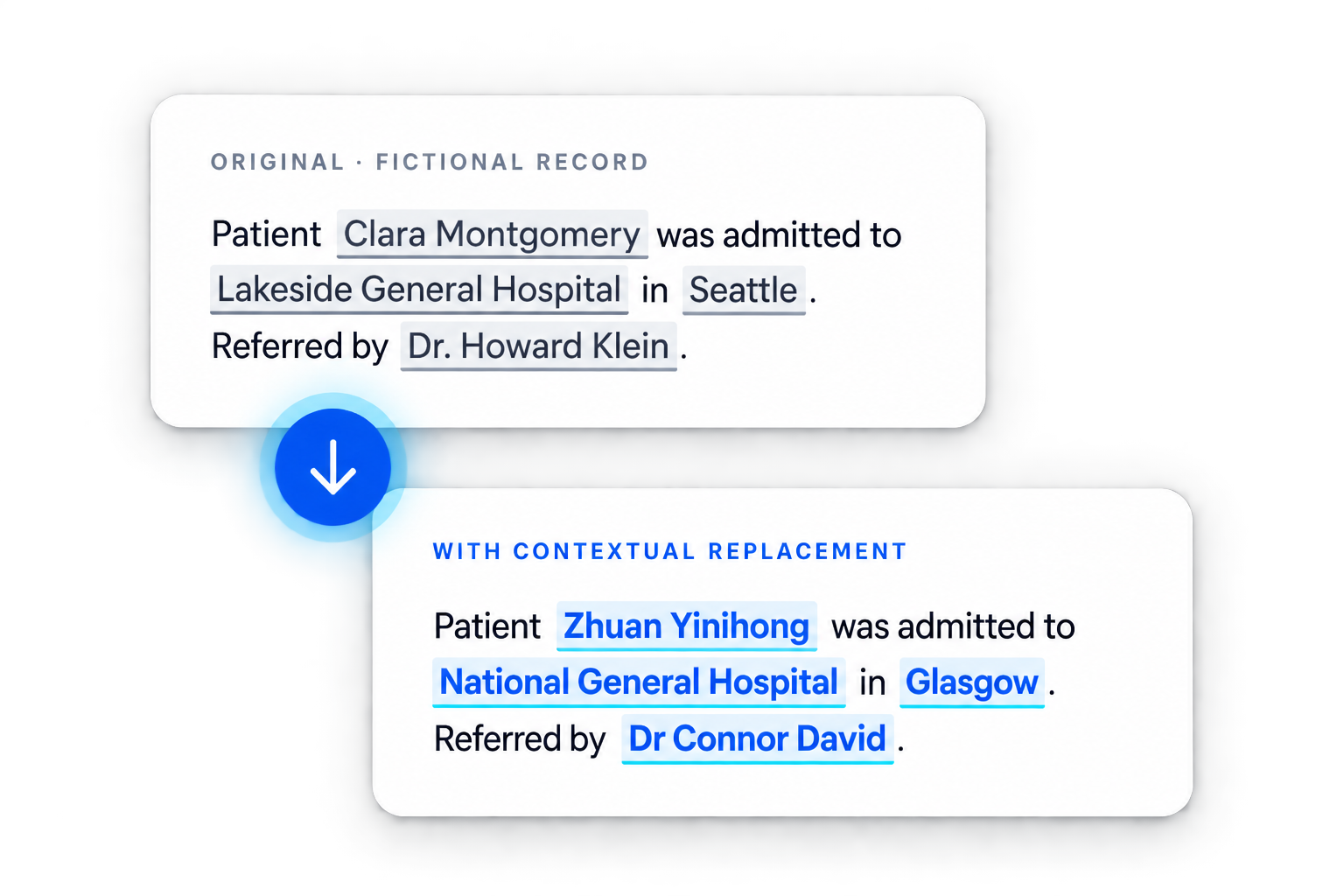
When applied to an embeddings pipeline, de-identification acts as a preprocessing step. Each chunk of text is passed through Limina's API before being sent to the embedding model. The output is a de-identified version of the same text, with sensitive entities replaced by their entity type labels (for example, replacing "John Smith" with "[NAME]"). That cleaned text is then embedded, and the resulting vector is stored alongside its de-identified source chunk.
The semantic integrity of the embedding is largely preserved. The context, relationships, and meaning carried in the text survive de-identification because those properties live in the structure and vocabulary of the document, not in the specific values of personal identifiers. An embedding built from de-identified text is still capable of capturing that a chunk is about group stage performance in a football tournament, or that a clinical note describes a specific type of adverse event, without retaining the identities of the individuals involved.
If your organization is handling sensitive data and needs a privacy-safe way to build AI applications, talk to the Limina team to learn how de-identification can integrate into your existing pipeline.
Setting up the development environment
To build this solution, you will need access to three things: Limina's de-identification API, an OpenAI API key for generating embeddings, and a Python environment.
If you do not already have access to Limina's de-identification service, you can request a free API key or set it up via AWS Marketplace. For OpenAI access, you can sign up directly on their platform. If you are new to Python, the official Python for Beginners guide covers environment setup clearly and quickly.
Once your environment is ready, you will need to install four Python libraries. The OpenAI Python client handles requests to the embedding model. Limina's Python client handles de-identification requests. SciPy provides the cosine similarity function used to compare embeddings. And Pandas stores the text and embedding data in a structured dataframe for easy retrieval.
pip install openai
pip install privateai-client
pip install scipy
pip install pandas
With these dependencies installed, the environment is ready.
Building the embeddings pipeline
How do you load and chunk the source document?
For this walkthrough, the sample data is a summary of each group's performance during the 2022 FIFA World Cup, drawn from Wikipedia. The document is structured so that each group's summary is separated by two newline characters, which provides a natural delimiter for chunking.
The first step is loading the data and splitting it into chunks using that delimiter. Each chunk is stored in a Pandas dataframe, creating the structure that will hold both the text and its corresponding embedding.
import pandas as pd

def get_dataframe(filepath):
    with open(filepath, 'r') as f:
        content = f.read()
    chunks = [chunk.strip() for chunk in content.split('\n\n') if chunk.strip()]
    df = pd.DataFrame({'text': chunks})
    return df
How do you generate and store embeddings?
With the data loaded, the next step is generating embeddings for each chunk. OpenAI's text-embedding-ada-002 model is a reliable choice for this. The function below takes a string and returns its embedding as a list of floats. The get_dataframe function is then updated to call this for each chunk and store the result.
from openai import OpenAI

client = OpenAI()

def get_embedding(text):
    response = client.embeddings.create(
        input=text,
        model="text-embedding-ada-002"
    )
    return response.data[0].embedding

def get_dataframe(filepath):
    with open(filepath, 'r') as f:
        content = f.read()
    chunks = [chunk.strip() for chunk in content.split('\n\n') if chunk.strip()]
    df = pd.DataFrame({'text': chunks})
    df['embedding'] = df['text'].apply(get_embedding)
    return df
How do you retrieve the most relevant chunk for a question?
Once all chunks are embedded, the pipeline needs to be able to accept a question, embed it, and compare that embedding to the stored chunk embeddings to find the closest match. SciPy's cosine distance function handles the comparison. Lower cosine distance means higher semantic similarity.
from scipy.spatial.distance import cosine

def get_related_text(question, df):
    question_embedding = get_embedding(question)
    df['relatedness'] = df['embedding'].apply(
        lambda x: 1 - cosine(x, question_embedding)
    )
    return df.sort_values('relatedness', ascending=False).iloc[0]['text']

def main():
    df = get_dataframe('worldcup_groups.txt')
    while True:
        question = input("Ask a question: ")
        print(get_related_text(question, df))
At this point the pipeline works: ask a question, get back the most relevant chunk. But the raw text is still being sent to OpenAI, which means any personal information in those chunks is exposed.
Adding privacy with Limina's de-identification API
Why does de-identification need to happen before embedding?
The order matters. If de-identification happens after embedding, the sensitive data has already been transmitted. The privacy protection has to be applied before any text leaves your environment for a third-party API. This is why de-identification is inserted as a preprocessing step inside the get_dataframe function, before the call to OpenAI.
The function below uses Limina's Python client to de-identify each chunk. The API returns a version of the text with sensitive entities replaced by their entity type labels.
from privateai_client import PAIClient

pai_client = PAIClient(url="<YOUR_PAI_URL>", api_key="<YOUR_API_KEY>")

def deidentify_text(text):
    response = pai_client.process_text(text_generator=[text])
    return response[0]['processed_text'][0]

def get_dataframe(filepath):
    with open(filepath, 'r') as f:
        content = f.read()
    chunks = [chunk.strip() for chunk in content.split('\n\n') if chunk.strip()]
    df = pd.DataFrame({'text': chunks})
    df['deidentified_text'] = df['text'].apply(deidentify_text)
    df['embedding'] = df['deidentified_text'].apply(get_embedding)
    return df
The dataframe now stores the original text, the de-identified version, and the embedding generated from the de-identified version. Nothing sensitive leaves your environment.
Do de-identified embeddings still return accurate results?
This is the key question, and the answer is yes. When you ask the updated pipeline the same question used to test the original version, it returns the correct chunk. The de-identified embeddings capture the same contextual relationships as the original embeddings because the meaning of the text is preserved even after personal identifiers are removed.
To verify this directly, you can add a comparison step to the main function that prints both the result from de-identified embeddings and the result from regular embeddings for the same question. In practice, the outputs are equivalent: the correct group summary is returned in both cases.
This is what makes de-identified embeddings a practical solution for regulated industries. You do not have to choose between accuracy and compliance. Limina's context-aware de-identification preserves the linguistic relationships that embeddings depend on, so the model has everything it needs to answer questions correctly without ever seeing the underlying personal information.
For organizations building AI applications on sensitive data, whether in contact center environments where call transcripts are embedded for analysis, or in clinical settings where patient notes feed into retrieval systems, this approach provides a clear path to privacy-safe deployment. To explore how Limina's de-identification fits into your specific architecture, get in touch with the team.
The complete script
Below is the full working script combining all the components described above.
import pandas as pd
from openai import OpenAI
from scipy.spatial.distance import cosine
from privateai_client import PAIClient

openai_client = OpenAI()
pai_client = PAIClient(url="<YOUR_PAI_URL>", api_key="<YOUR_API_KEY>")

def get_embedding(text):
    response = openai_client.embeddings.create(
        input=text,
        model="text-embedding-ada-002"
    )
    return response.data[0].embedding

def deidentify_text(text):
    response = pai_client.process_text(text_generator=[text])
    return response[0]['processed_text'][0]

def get_dataframe(filepath):
    with open(filepath, 'r') as f:
        content = f.read()
    chunks = [chunk.strip() for chunk in content.split('\n\n') if chunk.strip()]
    df = pd.DataFrame({'text': chunks})
    df['deidentified_text'] = df['text'].apply(deidentify_text)
    df['embedding'] = df['deidentified_text'].apply(get_embedding)
    return df

def get_related_text(question, df):
    question_embedding = get_embedding(question)
    df['relatedness'] = df['embedding'].apply(
        lambda x: 1 - cosine(x, question_embedding)
    )
    return df.sort_values('relatedness', ascending=False).iloc[0]

def main():
    df = get_dataframe('worldcup_groups.txt')
    while True:
        question = input("Ask a question: ")
        result = get_related_text(question, df)
        print("\nDe-identified result:", result['deidentified_text'])
        print("\nOriginal result:", result['text'])

if __name__ == "__main__":
    main()


Frequently Asked Questions
What are de-identified embeddings?
De-identified embeddings are vector representations of text that has been processed to remove or replace personally identifiable information before being sent to an embedding model. The resulting vectors encode the semantic meaning of the text without containing or exposing sensitive data. This approach is used to build privacy-safe AI applications, particularly in regulated industries where transmitting personal data to third-party APIs creates legal and compliance risk.
Does de-identification reduce the accuracy of embeddings?
In practice, de-identification has minimal impact on embedding accuracy for retrieval tasks. Because embeddings capture semantic context rather than the specific values of identifiers, replacing a name with "[NAME]" or a date with "[DATE]" does not meaningfully change what the embedding represents. The relationships and meaning that determine which chunk is most relevant to a question are preserved. Limina's linguist-built de-identification is particularly effective here because it understands entity context, ensuring that replacements are semantically consistent across a document.
Which industries benefit most from de-identified embeddings?
Any industry that works with personal data and wants to use AI on that data stands to benefit. Healthcare organizations embedding clinical notes, financial services firms processing customer documents, pharmaceutical and life sciences companies analyzing trial data, insurance providers working with claims information, and contact centers embedding call transcripts are all strong use cases. In each of these verticals, regulatory frameworks impose strict requirements on how personal data is handled, and de-identifying before embedding is one of the most direct ways to meet those requirements.
What types of PII does Limina detect and remove?
Limina's de-identification platform detects over 50 entity types including names, addresses, phone numbers, email addresses, dates of birth, national identification numbers, financial account identifiers, medical record numbers, and clinical terminology that could identify an individual. It supports detection across more than 50 languages and is built to understand context, so it can identify sensitive information in unstructured documents, clinical notes, transcripts, and other complex text formats where pattern-matching tools often miss entities.
Can this approach be used with embedding models other than OpenAI?
Yes. The de-identification step is model-agnostic. Limina's API returns cleaned text that can be passed to any embedding model, whether that is OpenAI's Ada, a locally hosted model, or another commercial embedding API. The pipeline described in this article uses OpenAI as an example, but the same pattern applies regardless of which embedding provider you choose.
Is this approach compliant with privacy regulations like HIPAA and GDPR?
De-identifying data before sending it to a third-party API directly addresses one of the core requirements in frameworks like HIPAA's Safe Harbor method and GDPR's pseudonymization provisions. However, compliance depends on the specific implementation, the completeness of de-identification, and the broader data governance context of your organization. Limina's platform is designed to support compliance in regulated environments, and the team can help you evaluate how de-identified embeddings fit within your specific regulatory obligations.